getting your beans in a row
this feature wasn't actually my idea
the beanie breakdown
- what we built
beanie lists: checklists for one-off projects or recurring chores that can reset on a schedule and attach to a trip or activity.
- how it helps you
packing lists and weekly grocery runs stay out of your to-dos, and the ones that are due show up in your daily briefing.
- where to find it
The Treehouse › Beanie Lists
Hi, my beans! Welcome to another episode of (say it with me): What can beanies do?!
For today’s episode, I’ve been racking my brain trying to come up with a delightful personal anecdote spectacular enough to tell the story of this amazing new capability. I even got so desperate as to ask AI:
“Hey claude-bot, what personal anecdote should I skillfully weave into a delectable tale to tell the story of this delightful new lists feature?”
“Wait a minute, didn’t you just tell me like two blogs ago that I don’t have any memory? Well the chickens have come home to roost now, haven’t they? Come up with your own story, beanie-boy.”
Hmm. No help there.
I couldn’t figure out why nothing was popping into my head, and then it hit me, like a bushel full of beans might hit somebody, which I think is an appropriate metaphor in this context.
This story isn’t mine.
Honey-dos, kid’s chores, and other ad hoc projects and lists weren’t really high on my tracker of things to do, until a couple early adopter beanies told me they should be:
“I think a useful update for Tasks would be the ability to create recurring tasks and to be able to choose a range of options e.g daily, weekly on multiple days of the week (e.g mon, & fri), weekly on one set day (just fri), or monthly on a day of the month (e.g 16th), or monthly on the second tuesday of the month for example.
As for my use case I would like to use tasks for chores and errands that often reoccur and that I would like to check off (tick to say they are done) as Activities cannot be used in this way - and that’s perfect for their purpose.”
There the ask, verbatim, from early beanie Brian (names changed to protect the innocent), for your anecdotal pleasure.
So it’s not my story to tell, but what the hell, I’ll tell it anyway.
Introducing: beanie lists!
Some people (including me, at one point) may be asking: Don’t we already have to-dos? Isn’t a to-do list a list?
You wouldn’t be wrong. But it turns out, there’s lots of different types of lists.
In my family, we’re preparing for an imminent trip to China. My wife is already there, and I’m literally (well, not literally, but just about) packing our stuff as I type this.
It turns out that to visit a foreign country where we need visas, travel documents, flight tickets, accommodation, activity planning, and more, there’s a fair amount of stuff to do for a family of five. And I don’t necessarily want my to-do list to look like it was blasted to smithereens by a dirty bomb.
Wouldn’t it be nice, neat, and tidy if I could take everything we need to do for that upcoming trip, and rather than blow up my to-do list, create a separate, dedicated “vacation planner” checklist, attached at the hip to my China travel plan?
I’ll answer that question for you: Yes, it would.
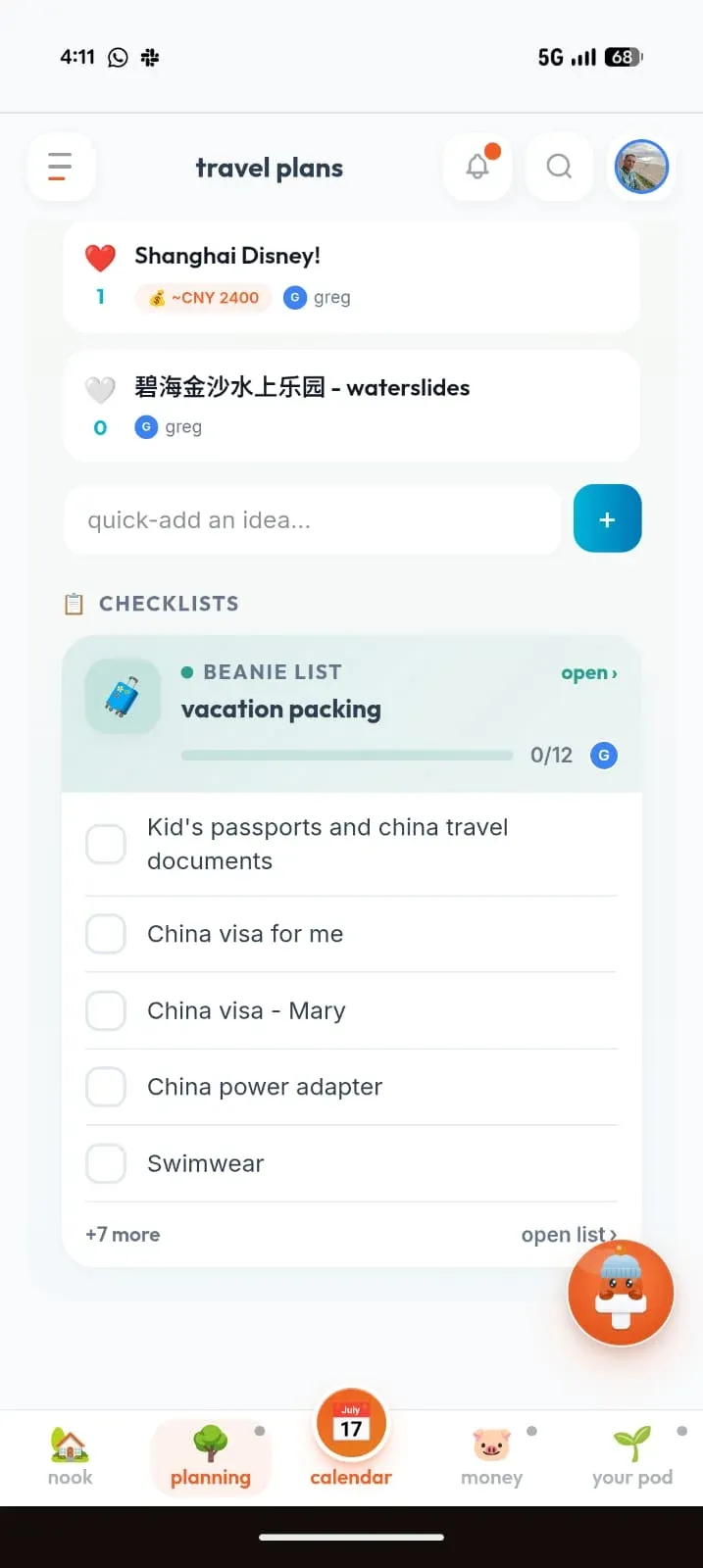
yes, this is useful. very useful.
That’s great for one-off projects, but what about those regular, daily grind type chores that happen on a regular basis?
Glad you asked.
As I may have mentioned once or twice, we have three little boys, but based on the volume of food consumed at our house every day, you might think there were more.
We need to keep our refrigerator stocked - and doing that requires a trip to the grocery store on a weekly basis. Wouldn’t it be nice if we had a pre-built, recurring grocery list - one that reset itself on a regular basis, and reminded me when it was time to stock up on milk and cookies for those little beanies to gobble down time and time again?
Yes, it would.
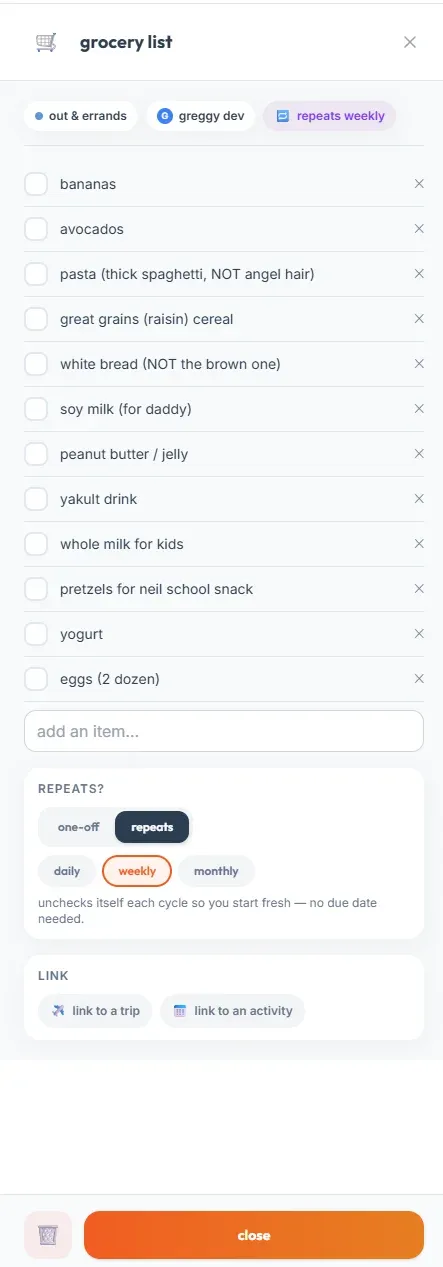
a weekly recurring grocery list that resets itself every saturday, just like my sanity
So, where can I find my lists?
But wait a minute, I hear my little beans tweeting (do beans tweet?) - what good are lists if they’re buried deep in the bowels of my app, hiding behind collapsed sidebars and multiple menus?
That’s true - if your lists don’t surface at the right place and at the right time, they’re not very useful - that’s why they’re front and center, as part of your daily briefing.
No really - it’s true. Go ahead and try it out:
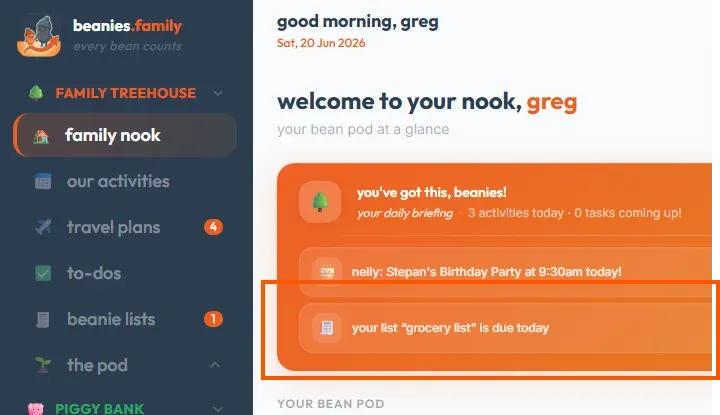
my daily briefing telling me for the fourth time this month that it’s time to go to our favorite place in the world, the market.
Another thing we’ve added to beanie lists is a set of Fair Play-inspired categories.
You can set a category for each list, based on who has the responsibility for a certain type of activity. In an “at-some-point-in-the-future” release (meaning, if people ask for it), I’ll even include the ability to add tags to lists and list items - such as conception, planning, execution, or anything else. So for those who follow the Fair Play system (which, by the way - I highly recommend), you can supercharge your family organization here by taking it to the next level.
One other thing - there may be a little animated surprise waiting for you when you complete a list!
So, to sum up:
Do your kids have chores they need to get done? That’s a list
Does your upcoming summer vacation have kid’s activities that need to be planned? That’s a list
Does your honey have things he or she needs to do? Well, that’s a honey-do list, which can be shortened in terminology to a list.
Using this feature in my own house, I’ve seen first-hand how keeping a categorized, dated, and assigned list helps keep our tasks in order, not just for myself, but for the whole family. So while this feature didn’t come from me, I’m glad it’s here, and I’m glad we can now use it.
Brian, I hope you enjoy it too, and thanks for the inspiration.
So to all my precious beanies who really want to get their beans in a row - start a list, and let’s get this thang done.
Stay organized, my beans
greg
What do you think of this new feature? Let me know your thoughts (or tell me what to build next) on the beanies.family discord.
follow me on substack for a new beanstalk post every friday (well, usually)