a widget for your fidget
the beanies are dancing on your home screen
the beanie breakdown
- what we built
home screen widgets for iPhone and Android in three sizes, plus iPhone lock screen widgets, showing your family's day at a glance.
- how it helps you
you see today's plans, who's doing drop-off and pick-up, dinner and your to-dos without opening the app.
- where to find it
long-press your home screen, add a widget, choose beanies.family, then long-press it to pick what it shows.
Good morning, my beans. Yes, this is still me writing. AI would never write this many random bean references, of that I’m sure.
Just a quick post this week as I’ve been busy (even more so than usual) with a super-special surprise project (hint: it relates to musicals, which is my other passion - I know, I’m a nerd in every universe), but I just wanted to say how wonderful it was to wake up a few days ago to the feedback below from one of our amazing early beanies (edited for length and clarity):
“Hi, i love this app tbh and i created for my whole family. Now i could plan the days ahead without the need to text everyone one by one. They can check it in their own app. But i would love more if i can add a widget of huge calendar on my home screen or any widget will do. Other than that all is perfect! Tqsm again for this app.”
early beanie Ummu
It’s great hearing from my beans, and it’s even better when they ask for stuff that we can actually build!
I’m a huge fan of home screen widgets (when they work), and I’ve had a beanies home screen widget sitting idly on my to-do list for what seems like an eternity. I kept putting it off, as I couldn’t justify spending time building a widget when we still had high-priority data and security issues on top, but now that I’ve legitimately burned through most of that backlog, Ummu’s feedback was the perfect excuse to get my lonely widget issue off the bench, and into beanies.family!
Great home screen widgets allow you to glean information without even lifting a finger - at a glance, I can know whether it’ll rain tomorrow, the dollar-yen exchange rate, my number of unread emails, and the current time in Siberia (I’m just talking about widgets in general here - unless you happen to live in Siberia, in which case the beanies widget will tell you that too). The best widgets give you a lot of options and configurability; the bad ones force you into one way of working and a poor design. So when it came time to build a beanies.family widget, I knew we had to do it right.
So, without further ado, I give you: the beanies.family widgets!
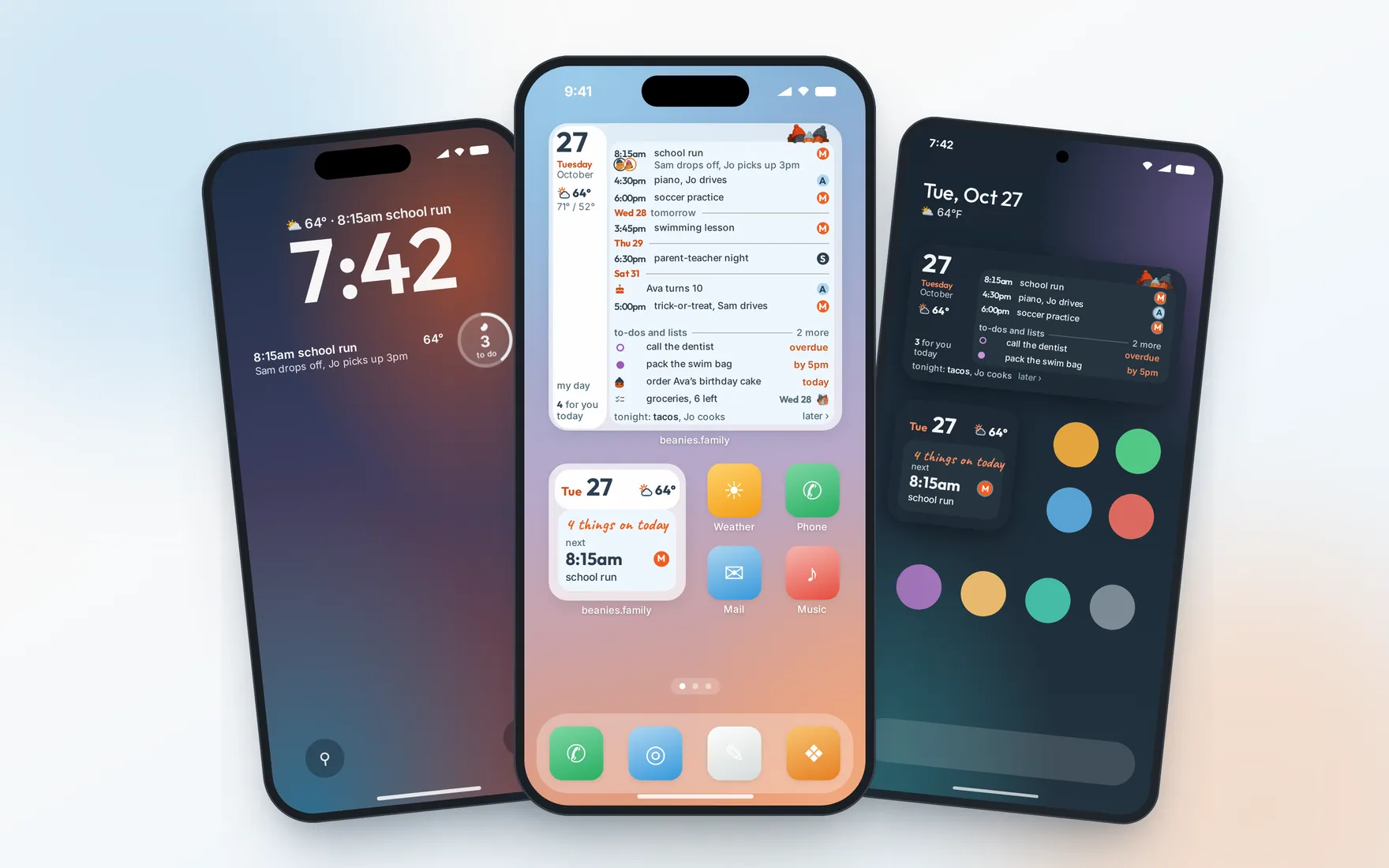
i love fidgeting with widgets
I love widgets too! What can I see?
I feel like lots of widgets shortchange you on available information, and many don’t give you enough space to truly get everything you want to see. I designed our beanies widgets in three sizes, all of which allow you to choose the information you want - activities, travel plans, to-dos, lists, birthdays, hints and more. I have all three of them on my phone, but then again, I’m probably not your typical beanies.family user. You can choose the size that works best for you, and that’s what makes this country great (I’m not actually sure which country you’re in, but I’m sure it’s great).
There’s even a lock screen widget for iPhones, which I didn’t realize was a thing, since apparently it’s only possible on iPhones (and as an Android user, I’m jealous now). Seeing the beanies lock widget on my tester iPhone, though, I love having my next activity staring me in the face when I pick up my phone (of course, provided that’s not a privacy concern - that’s up to you. You can also choose to hide event titles if you prefer).
For those who prefer larger text, the text size is also configurable. Personally, I keep the text on my phone screen almost impossibly small, as I’m in an acutely stubborn phase of old man eyesight denial, and I strongly feel that having minuscule phone screen text will somehow reverse my eyeballs’ inevitable death march towards full-blown bifocal-land. I am squinting as I write this.
In any case, I love our beanies.family widget (the parts that I can make out, anyway), and I hope you do too!
Give it a try!
I’m curious to hear what all of you think (especially the early beanie who asked for this in the first place)! So update your app, add the widget to your home screen (it’s already installed if you have the latest app), and let me know your thoughts!
If you’re not sure how to install a widget, the process is almost always to simply long-press on any empty space on your phone’s home screen, then choose beanies.family from the list of available widgets, and drag it to where you’d like it to be!
All in all, I think it was less than a week from received feedback to released feature! I’m excited that we could get this out there quickly, and I hope this is useful for everyone! If you also have feedback you’d like me to hear (and implement), let me know in the room where it happens!
Enjoy your new widgets, my beans. Speak soon.
-greg
follow me on substack for a new beanstalk post every friday (well, usually)