keeping your calendars in sync
the inevitable (and inimitable) google calendar integration
the beanie breakdown
- what we built
a Google Calendar connection that pushes your beanies activities and travel plans out to the Google calendars you choose.
- how it helps you
family members who live in Google Calendar still see every event, with who's driving and who's paying packed into the notes.
- where to find it
Settings › Google Calendar
First off, to all the fans of my Substack who regularly heart my articles, let me apologize for missing my scheduled post last week while I was travelling. You must be feeling incredibly sad and lonely. I therefore offer my sincerest and most humble apologies, to both of you.
However, now that my trip is over, I bring positive news: The official approval for the beanies.family Google Calendar integration is in! So I’m back to writing for my precious beans, bestowing upon my loving followers, week after week, breaking beanie news and amusing anecdotes, in a desperate but ultimately vain effort to quench the massive thirst, deep in my soul, that can only be satisfied by restacks and a handful of likes.
But getting back to the point.
I’m the author of beanies - the owner, the designer, the developer, and the first pilot user. What’s my process when a new family activity comes up? First, I add it in beanies, then I add it in our family’s shared Google Calendar.
Fun.
Telling someone to abandon a system they’ve been using for 20 years is a big ask - I know from experience. But seriously, if I, the head beanie-dude himself, can’t break the Google Calendar habit, how can I expect that from others?
There’s always that one person in your life who refuses to change their system, and will never give in no matter how much you plead (you know who I’m talking about). How can we work with that person to adopt this new and exciting family organization system, while still staying true to what’s familiar?
I don’t know the answer to that, so I posed the question to my claude-bot. Because clearly, somebody smarter than me needed to figure this quandary out.
Hey, claude-bot - a calendar app on your phone is ubiquitous, and it’s the first thing most people see on their home screen. beanies is also a calendar - or, at least a big part of it is. So, where do we fit in?
The answer? Simple. Just push the events in beanies.family to your Google Calendars, you knucklehead.
I’m paraphrasing. My claude-bot didn’t actually call me a knucklehead. He used the term “lunkhead”, which I believe is more politically correct.
So, here we are. I’m happy to present, to my lovely beanie users: the beanies.family Google Calendar integration!
If you’re attached at the hip to your calendars (like me), trust me, I understand. beanies.family now pushes your events to your precious calendars - whether it’s your personal calendar, your partner’s calendar, your shared family calendar, or anything else, you’re covered. I know - you’re so happy right now you could cry. Or maybe that’s just me.
How does the beanies calendar integration work?
First, set it up.
Navigate to the settings page and find the “calendar” box. From there, tap “connect a google calendar” and complete the Google consent flow to allow beanies.family access to push events to your connected calendar(s).
Privacy aside (updated September 2026): beanies never reads your events unless you specifically ask it to. Day to day, all we ask Google is whether you’re busy at a given time, never what you’re doing. The one exception is the one-time import, added in September 2026, where you can ask beanies to import your existing events: that reads the title, time, place and repeat pattern of events on calendars you pick, you review every one before anything is imported, and it runs once. Guest lists are never read, at any time.
I should correct something I wrote here originally. I said that reading only your busy/free status was a limitation of the scopes Google allows. That wasn’t right. The scope we were approved for has always permitted reading event content on calendars you own; not doing it was our choice, not Google’s rule. The choice hasn’t really changed, it’s just become explicit: we don’t read your events, unless you ask.
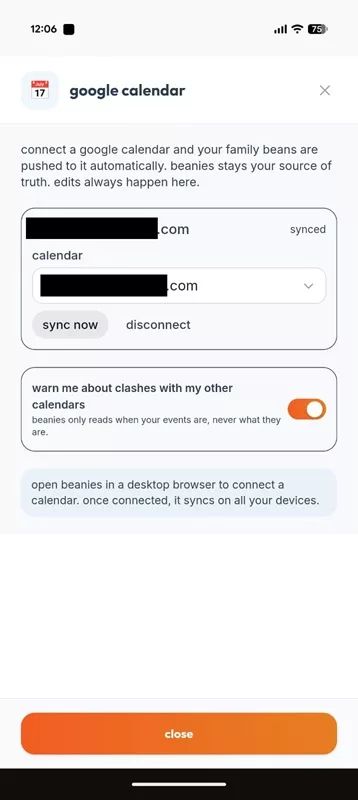
connect one (or more) calendars here, and every activity or travel plan in beanies will magically appear in those calendars
Add an event to the beanies.family activity calendar. A birthday party, a soccer practice, a date night, or anything else, and boom! Like magic, it’s added, not only to your beanies calendar, but pushed to your connected calendars as well, including all of the information in the event.
- Your calendar? Check
- Your partner’s calendar? Check
- Your shared family calendar? Check
- Your secret lover’s diary? That’s up to you. I’m staying out of that one.
Why only push? Why don’t you pull events from our calendars too?
Two reasons.
First: Synchronization nightmare hell.
For true two-way synchronization to work, your two sources of data are going to be constantly fighting about who’s right. What happens when two events are scheduled at the same time, for the same people? Something, or somebody, has to break the deadlock.
Your family deserves a single, solitary, deliciously golden source of data. When your data fans out from that one source, cleanly, to as many calendars as you’d like, that’s a beautiful thing.
The second reason is that beanies.family activity and travel data is so much richer than what you’d get in almost any other calendar app.
Look at the fields you get with Google Calendar:
- Date
- Time
- Title
- Description
Bo-orrrring.
What do you get with beanies? Not only the above, but:
- Who’s going?
- Who’s paying?
- Who’s picking up?
- Who’s dropping off?
- Who’s the instructor?
- What’s their emergency contact number?
- Lots more
All of this rich data is pushed to your connected calendars, even if we have to literally (well - figuratively) stuff it into the description field. So it’s always there, and you never miss a beat.
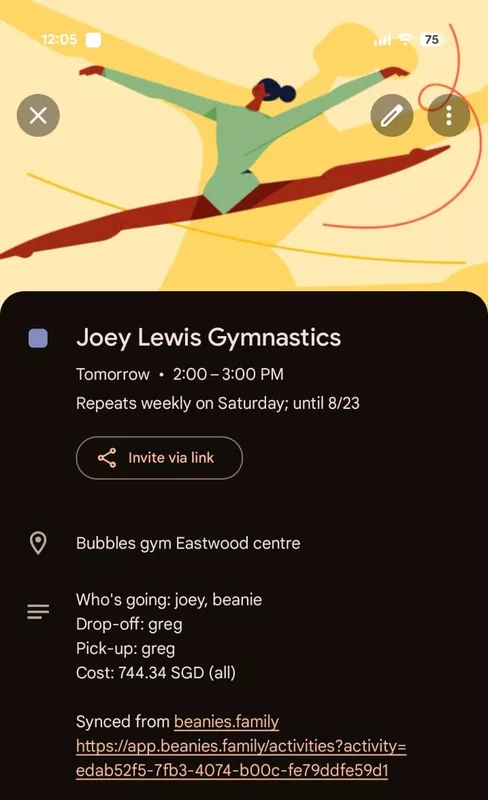
there’s so much useful information here i could cry. again.
Start in Google and you’re lost. Start in beanies and you’re found.
But still - what happens if there’s a conflict?
That’s a fantastic question. Who knew you were so inquisitive? Maybe it’s time for you to sit down now.
Okay, if you really want to get into it, I’ll go there with you. Take my hand, once more, Thelma and Louise style, and let’s do this.
If beanies tries to push an event to one of your calendars when an item or event already exists, it’ll first check to see if the event was created by beanies or not. If it was created by beanies and the titles match up, we’re sittin’ pretty. We update that event with the latest details so everything is in sync. Easy peasy, lemon squeezy.
However, if beanies finds an event that doesn’t match the one we’re trying to push, then Houston, we have a problem. First, beanies will create the event and label it as a potential conflict. A marker will be placed on the beanies.family calendar item as well, as if to tell you, “Hey! There’s something not right here! Maybe you need to have a talk.” And you can dismiss that conflict warning at any time if the conflict is expected.
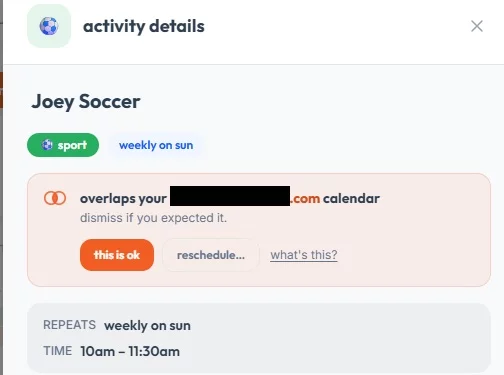
just beanies trying (perhaps too hard?) to be helpful
Oh - by the way, you’re welcome.
OMG, this is it! This is the feature I’ve been waiting for!
Really? Well then why the heck didn’t you tell me earlier?!
You know I’ve been languishing in a semi-empty discord chat room (no offense to the wonderful early adopter beanies who are already there), waiting like a disgruntled Aaron Burr for people like you to join and start a conversation! Sorry for throwing in yet another reference from my favorite historical musical. But seriously, don’t you want to be in the room where it happens?
So join me on discord and let me know! Not to mention, be the first to hear about new features, my thoughts on what’s to come, upcoming launches, and just have some general, fun, beanie (or non-beanie) related chat.
So there we are. I hope you enjoy your newly enriched calendars. And to pull back the curtain a bit, I’m hoping that (real) apps are also coming soon.
Stay on schedule, my beans
Peace,
greg
follow me on substack for a new beanstalk post every friday (well, usually)